

What Is a Dataset?
A dataset is a collection of related documents, typically grouped by source. Datasets are created automatically when you sync a data source, grouped by thesource field in your vector database.
Product Documentation
All docs from your product guide
Support Articles
Knowledge base articles
Engineering Wiki
Internal technical docs
API Reference
API documentation
Viewing Dataset Analytics
1
Navigate to Datasets
Go to Data → Datasets in the navigation menu
2
Browse Your Datasets
You’ll see a list of all datasets with their key metrics at a glance
3
View Detailed Analytics
Click on any dataset to see comprehensive analytics and insights
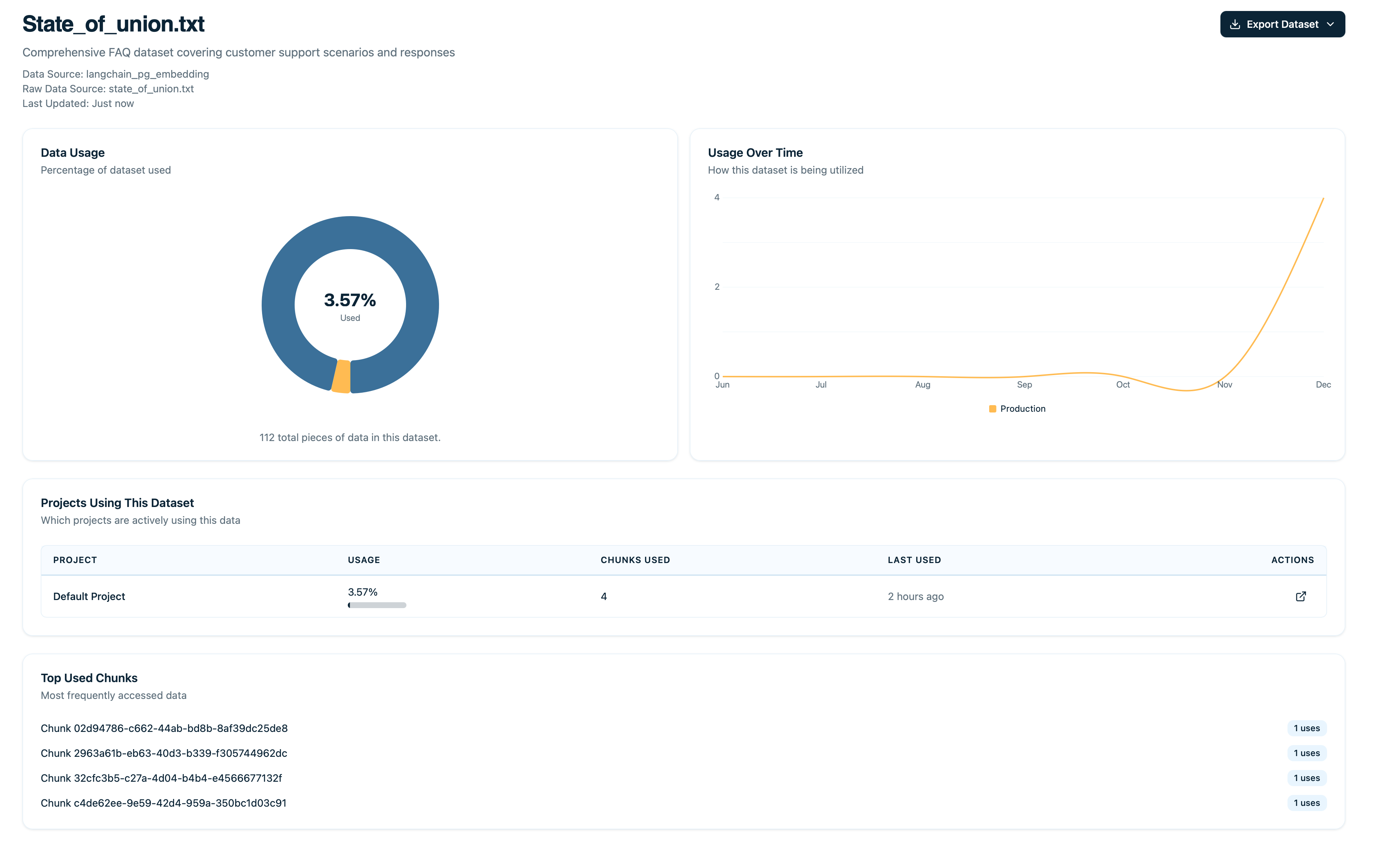
Dataset Analytics
Dataset Overview Metrics
Total Documents
How many documents are in this dataset.
Total Retrievals
How many times any document in this dataset was retrieved.
Usage Rate
Percentage of documents that have been retrieved at least once.Average Relevance Coming Soon
Mean relevance score across all retrievals in this dataset.Document Distribution
See how retrievals are distributed across documents to understand which content is most valuable and which might need attention.Top Documents
The most-retrieved documents in this dataset.Unused Documents
Documents with zero retrievals that may need attention.Click on any unused document to read its content, check if it should be deleted or improved, and verify embeddings are working.
Retrieval Distribution Graph Coming Soon
Histogram showing how many documents fall into each retrieval count bucket.Highly concentrated retrievals? If top 10 documents account for >80% of retrievals:
Usage Trends Over Time
Graph showing retrieval activity for this dataset over time: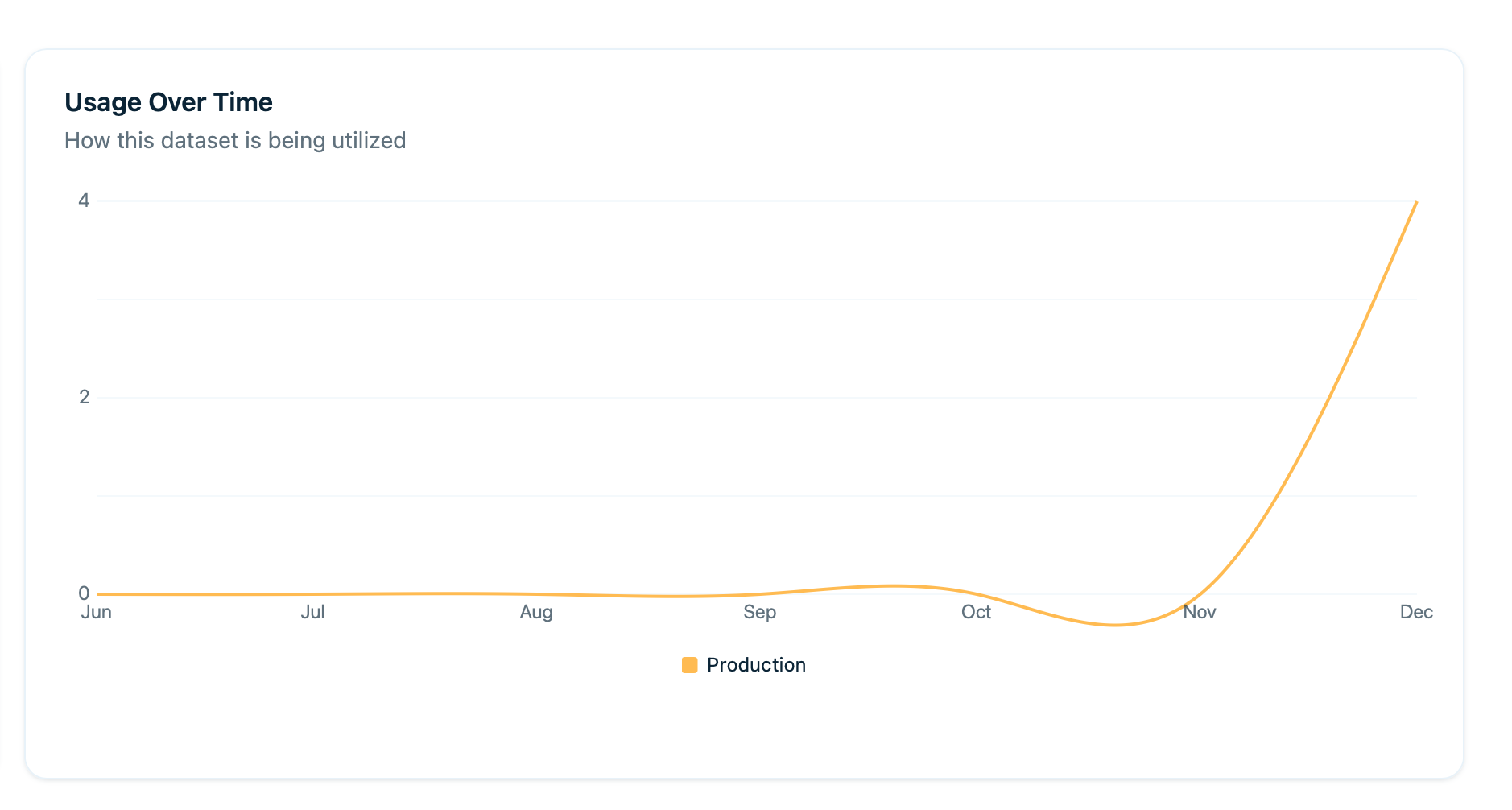
Dataset Usage over Time
Quality Indicators Coming Soon
User Feedback Correlation
How users rate traces that used documents from this dataset:Coverage Score
What percentage of queries in your traces find relevant documents (relevance > 0.7) from this dataset.Comparing Datasets
View multiple datasets side-by-side to make informed decisions about where to focus your efforts.Use comparison view to:
- Prioritize which datasets to improve
- Allocate resources (focus on high-usage, low-quality datasets)
- Identify which datasets can be archived or removed
Use Cases
Identify Low-Quality Datasets
Goal: Find datasets that need improvement.1
Sort by Average Relevance
Sort datasets by Average Relevance (low to high) to surface the lowest quality datasets
2
Check Bottom Datasets
Review the bottom 3 datasets and examine sample documents from each
3
Determine Action
Decide what to do based on the root cause:
- Documents are poorly written → Rewrite
- Embeddings are bad → Re-embed
- Dataset is irrelevant → Archive or remove
Result: Higher overall retrieval quality across your system.
Prioritize Dataset Updates
Goal: Focus updates on high-impact datasets.1
Sort by Total Retrievals
Sort by Total Retrievals (high to low) to identify your most-used datasets
2
Check Last Updated Date
Review the “Last Updated” date for top datasets
3
Prioritize Old, High-Traffic Datasets
Focus your efforts on updating old, high-traffic datasets first. Deprioritize low-traffic datasets.
Result: Maximum impact from limited resources.
Find Coverage Gaps
Goal: Discover topics where you need more content.1
Identify Low Coverage Datasets
Look at datasets with low coverage scores to find areas with content gaps
2
Analyze Failed Retrievals
Check traces that found no relevant documents and group by topic/query type
3
Fill the Gaps
Identify missing content areas and add new documents to fill those gaps
Result: Better coverage, fewer unanswered queries.
Measure Dataset Improvement
Goal: Track progress after improving a dataset.1
Record Baseline Metrics
Document current metrics: usage rate, average relevance, and user satisfaction
2
Update and Re-sync
Update documents in the dataset and re-sync your data source
3
Wait for Data
Wait 2-4 weeks for enough usage data to accumulate
4
Compare Results
Check metrics again and compare before/after to measure improvement
Result: Data-driven proof of improvement.
Retire Unused Datasets
Goal: Clean up datasets no one uses.1
Filter Low Usage
Filter to datasets with <5% usage rate over 90 days
2
Review Content
Review what’s in these datasets to understand why they’re unused
3
Determine Root Cause
Decide if truly irrelevant or just poorly embedded
4
Clean Up
Archive or delete unused datasets to keep your vector database lean
Result: Faster retrievals, reduced storage costs.
Dataset Health Score
Arcbeam calculates an overall health score for each dataset based on multiple factors:Usage Rate
Higher is better - more documents being retrieved
Average Relevance
Higher is better - stronger semantic matches
User Satisfaction
Higher is better - positive user feedback
Coverage
Higher is better - fewer gaps in content
Recency of Updates
More recent is better - fresh content
Use health score to:
- Quickly assess all datasets at a glance
- Prioritize which datasets need work
- Track improvements over time
Setting Goals
Set improvement targets for your datasets to drive measurable progress.Example Goals
Product Documentation Dataset
Current State:
- 42% usage rate
- 0.68 avg relevance
- 60% usage rate
- 0.75 avg relevance
- Update top 20 docs
- Remove 15 unused docs
- Re-embed all documents
Support Articles Dataset
Current State:
- 35% user satisfaction
- 70% user satisfaction
- Rewrite top 10 most-used articles
- Add 20 new articles for gaps
Best Practices
Review Dataset Health Monthly
Set a recurring task to monitor and improve your datasets.Focus on High-Usage Datasets First
Limited time? Prioritize based on this decision matrix:Track Metrics Over Time
Create a spreadsheet to monitor trends and patterns.Correlate with Business Goals
Align dataset priorities with business needs for maximum value.Re-embed Periodically
Every 6-12 months, refresh your embeddings to maintain quality.Next Steps
Document Usage
Drill down into individual documents
Data Lineage
Track which source files are most valuable
Add Data Sources
Keep datasets up to date
Debugging RAG
Use dataset metrics to improve RAG